The family organization app for calmer days.
HomeGrown gives parents one calm place to plan family life, share chores, keep memories, and find personalized guidance for the moments that matter.
Parenting wasn't meant to feel this hard.
You're not failing. You're holding too much in your head, with no system designed for the quiet, beautiful chaos of family life.
"I can never keep it all in my head."
School forms, doctor visits, milestones, permission slips, what's for dinner — it's all somewhere, and never where you need it.
"Am I doing enough for them?"
Every child is different. You shouldn't have to Google milestones at midnight, hoping a stranger's blog post is the answer.
"Weeks slip by in a blur."
You promised yourself this year would be different — more present, more intentional. And then the calendar fills up again.

Put the family details somewhere you can share.
HomeGrown turns the loose ends into a shared place to start: a plan for today, thoughtful guidance when you need it, and a way to keep chores, memories, and family to-dos moving together.
A calmer family organizer in your pocket.
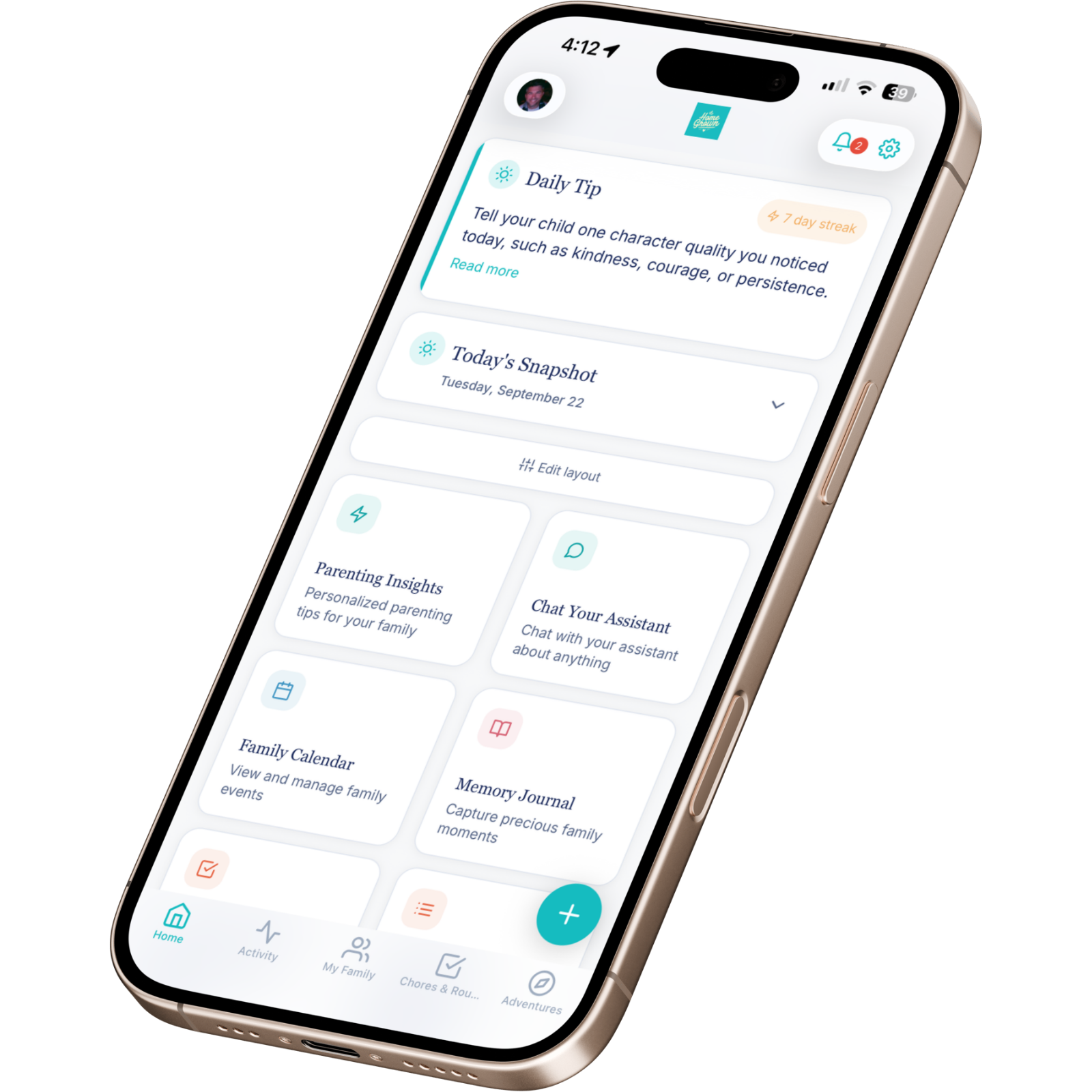
HomeGrown brings a daily plan, shared family tools, and personalized AI guidance together, so you can stop juggling apps, sticky notes, and group texts.

Three quiet steps. That's it.
Start with one small habit: put the details somewhere you can find them, then let the next step become clearer.
Sign up in a minute
Start with the free plan—no credit card needed. Create your account with email and password, then choose an optional goal or explore right away.
Add your kids
Add the family details you choose to share. When an AI feature is available, it can use relevant details to shape its suggestions.
Open it daily
One screen, one calm plan. Capture memories, share with your partner, breathe a little easier.
Tools to fit the shape of your family.
Choose the tools that help with everyday family details, so you can spend more attention on the people in front of you.
A calm daily plan
Wake up to today's gentle list — what matters, who needs what, and nothing you didn't ask for.
Personalized AI insights
Tips, activities, and gentle nudges shaped around each child's age, stage, and interests.
Chores that feel like a game
Use points and rewards to make chores visible and track progress together.
A place for family milestones
Save the photos, voice notes, and first words you choose to add, alongside the moments they belong to.
Weekend adventures, planned
Explore AI-suggested family ideas shaped by details such as your budget, weather, and interests.
Meal plans & grocery lists
The free plan includes one AI meal plan each month. Premium removes that published free-plan limit on supported meal-planning tools.
See everything HomeGrown includes
- Child profiles (one child on the free plan)
- Daily parenting tips with streak tracking
- Family to-do list; partner sharing requires Premium family invitations
- Document vault for school & medical forms
- Family invitations with role-based access (Premium)
- Voice & video memory capture
- Legacy Journal time-capsule entries
- Optional Gmail task suggestions when available
- Chore points & reward redemption
- Optional Google Calendar connection (Premium)
- Notifications and summaries when enabled and available
- AES-256-GCM encryption at rest for uploaded files and documents
- Privacy and security details in the published policies

Useful when the day is already full.
Open the daily plan for the practical next step. Use age-aware guidance when you're unsure. Keep chores, memories, meals, and family to-dos close enough to help without asking you to become a project manager.
The next year, with or without HomeGrown.
A small daily habit changes how an entire season of family life feels.

The blur of "we'll get to it tomorrow."
- Permission slips found at the bottom of a backpack, days late.
- The same tired argument about chores, every Saturday morning.
- Milestones half-remembered, photos lost in a 30,000-image roll.
- Weekends that disappear without a single intentional moment.
- That low, persistent worry: am I doing enough?
Quiet, calm, present.
- One glance in the morning and you know what today actually needs.
- Chores and points that are easier for the family to see and track.
- A place to save the milestones and voice notes you choose to add.
- Family adventure ideas to help plan a weekend together.
- A clearer view of what your family has planned.
More of the moments you are trying to protect.
These editorial images show the everyday context HomeGrown is designed for. They are not customer testimonials or product results; the work is to help you make space for your own family story.


Start free. Upgrade when you're ready.
Start with the free plan. Premium is optional; manage or cancel a subscription through the store where you subscribed. Review the current offer in the app before purchasing.
Free
- Try the calm daily plan with 1 child
- 3 AI insights each month
- Track 2 starter chores & 2 rewards
- Save 1 memory & 1 milestone
- 1 family adventure & 1 chat each month
- 1 AI meal plan each month
- 2 family to-dos & 2 documents
Premium
- More room for AI insights, chat, and adventures without published free-plan caps on supported features
- Keep chores, points, and rewards organized together
- A place to save the memories and milestones you choose to add
- AI-suggested ideas to help plan family time
- Invite partners, extended family, or caregivers with role-based access
- Meal planning and grocery tools without published free-plan limits on supported features
- Optional Google Calendar connection for selected calendars
Answered, before you have to ask.
Still curious? Email hello@myhomegrown.app — we're parents too, and we read every note.
Is my family's data really private?
HomeGrown stores family information to provide the app. Selected information may be processed by service providers for features such as AI, subscriptions, email, and calendar connections. Uploaded files and documents use AES-256-GCM encryption at rest; this does not describe encryption for every type of stored information. See the Privacy Policy for details and role-based access.
How much does it cost?
HomeGrown has a free plan with limits on some features. Premium removes published free-plan limits on supported features; access depends on role, permissions, feature flags, and service status. The current listed prices are $5.99/month or $59.99/year; prices, offers, and availability can vary by store or region. Check the subscription options in the app before purchasing.
How do I manage or cancel Premium?
Manage or cancel through the store where you subscribed. On iPhone or iPad, use Apple ID > Subscriptions; if you subscribed through Google Play, use Payments & subscriptions > Subscriptions. Cancellation and access timing follow the store's subscription terms; the in-app subscription screen links to the store's management page.
How does the AI know what to suggest?
When an AI feature is available and you use it, your prompt and relevant family information may be processed by the configured AI service provider to generate a response. Depending on the feature, information can include details you entered about family members. AI-generated content is informational only, not professional advice.
What is the AI Assistant?
The AI Assistant is separate from AI Chat, is available only to parent accounts when enabled, and may not be available to every account. It proposes actions for you to review and confirm before changes are made.
Can my partner use it too?
Premium families can invite a partner, extended family member, or caregiver. Access depends on role and supported permissions. Caregivers cannot access documents or features restricted to their role.
Is it safe for my kids?
HomeGrown is designed for adult parents and guardians to manage family information; children do not need their own accounts. Information you enter about children may be shared with service providers when needed for features you use. Review the Privacy Policy before entering sensitive information.
What if I switch to a new phone?
Your account information is stored to provide HomeGrown. Sign in on a supported device to access available account and family information. Device and platform availability may vary; this page links to the current iPhone and iPad App Store listing.
Can HomeGrown connect to Gmail?
Parents can optionally connect Gmail when the integration is available. HomeGrown requests read-only access to scan messages using family filters; message details and a short snippet may be used to suggest a to-do or calendar event. A parent must approve a suggestion before it is added. Gmail can be disconnected in Settings.
How can I delete or export my data?
You can start account deletion in Settings. Shared family records and data held by service providers may not be removed at the same time. Contact hello@myhomegrown.app to ask about an export or deletion details; there is no self-service export in the app.
Your kids are growing up right now.
You'll never get this season back. Give yourself the calm, clarity, and connection to be present for it — starting today.
Download on the App Store